AI receptionist for small business: what it does and who it suits
GuidesBy Ringzel team8 min read
An AI receptionist for a small business answers the calls you can't take, talks with callers in your business name, asks the questions you've set, and sends you the details. It suits owners who still get work by phone but can't always pick up. Plans start from £99 a month.
Definition. An AI receptionist (also called an AI answering service, AI phone answering service, AI answering service for business, AI voice receptionist or AI phone receptionist) answers business calls, follows rules you set, captures who called and what they need, and passes that to you. It is not a press-1 menu, and it is not voicemail.
TL;DR: key takeaways
- An AI receptionist for small business picks up the calls you miss, asks your questions, and sends you a usable summary.
- It fits trades, clinics, salons, agents and local services where the phone still brings paid work.
- Skip it if sales are almost all online, or every call needs complex human judgement.
- Setup means clear rules, honest disclosure that it is automated, and a path to escalate.
- Ringzel plans start from £99 a month with unlimited calls; try it on a 14-day free trial.
What does an AI receptionist for small business do?
Short answer: An AI receptionist answers the calls you send it, greets callers in your business name, and says it is automated. It asks the questions you've set, answers common FAQs from your hours and services, then sends you a summary, often with a recording and transcript. On higher plans it can book appointments or put urgent callers through to you.
It holds a conversation rather than a press-1 menu, answers common FAQs, asks for name, number, need and urgency, then sends a summary. Higher plans may also book appointments or put urgent callers through. Unlike voicemail, an AI phone answering service keeps talking while the caller is interested; an AI voice receptionist follows your rules on a flat monthly plan. See whether anyone leaves voicemail, AI receptionist vs answering service and what an AI receptionist is.
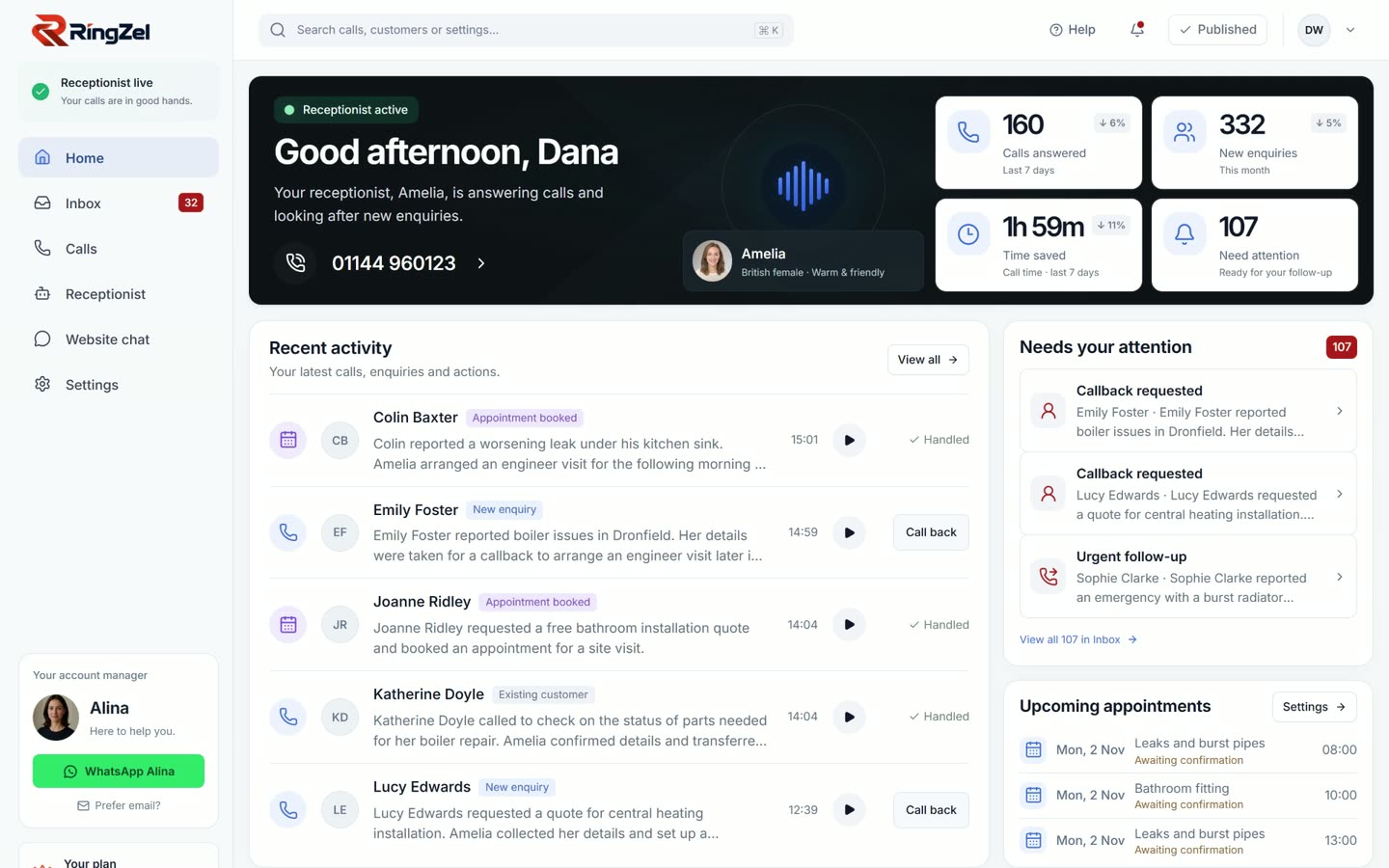
Video transcript: Ringzel dashboard
The dashboard opens on a Ringzel account. No spoken audio.
Why do small businesses miss calls?
Short answer: Most small businesses miss calls because the person who would answer is also doing the work. About 75% of UK private-sector businesses have no employees besides the owners. BT/Censuswide found 67% of SMEs miss at least one call they believe costs them business on an average day, and Fix Radio found 60% of tradespeople struggle to answer while working.
About 5.7 million UK private-sector businesses (FSB/DBT). BT's indicative loss is £3.7 billion (BT newsroom); consumers give three attempts (75%) and 58% would warn others. Fix Radio: 34% of tradespeople thought they had lost work (survey). Ofcom (July 2025): 88% of SMEs use mobile-network calls. See the missed call cost guide for UK trades.
Who is an AI receptionist for small business suitable for?
Short answer: An AI receptionist for small business suits firms where new customers still ring, and where the owner or a small team can't always pick up: trades on site, clinics and salons between appointments, agents on viewings, and shops where staff are serving when the phone rings.
| Signal | Why it matters |
|---|---|
| Phone enquiries turn into paid work | Quotes, bookings, viewings, call-outs |
| You're often unable to answer | On tools, with a patient, driving, in meetings |
| Calls arrive outside quiet desk hours | Lunchtime, evenings, weekends, bank holidays |
| You can describe what "good" looks like | Questions to ask, what is urgent, jobs you don't take |
| You want a predictable monthly cost | Flat plans suit jumpier call volumes |
Signal
Phone enquiries turn into paid work
- Why it matters
- Quotes, bookings, viewings, call-outs
Signal
You're often unable to answer
- Why it matters
- On tools, with a patient, driving, in meetings
Signal
Calls arrive outside quiet desk hours
- Why it matters
- Lunchtime, evenings, weekends, bank holidays
Signal
You can describe what "good" looks like
- Why it matters
- Questions to ask, what is urgent, jobs you don't take
Signal
You want a predictable monthly cost
- Why it matters
- Flat plans suit jumpier call volumes
Our guide to out-of-hours call answering covers evenings and weekends. For published prices, see telephone answering service cost and AI receptionist cost.
Which industries use an AI receptionist?
Trades (construction ~885,000 UK SMEs, 16%, FSB/DBT): capture address, fault and urgency. Clinics, salons, agents, shops and local services: routine booking and hours while staff are busy; sensitive advice stays with a person. See industries.
Video transcript: Ringzel bookings
The bookings screen lists visits booked on the call, with options to confirm or cancel. No spoken audio.
Who is an AI receptionist not for?
Short answer: Skip an AI answering service if almost all sales happen online and callers rarely become customers, or if every call needs complex judgement a script cannot cover. It also will not replace a front-of-house person who greets walk-ins. Employing a receptionist costs about £21,000 to £25,000 a year in salary before employer costs, per the National Careers Service.
Start carefully if sales are mostly online (missed call calculator), every call is unusual, callers refuse automation (will customers hang up), or you need walk-in cover. Spend decision: is an AI receptionist worth it.
What should a good AI receptionist setup include?
Short answer: Clear rules for which calls it gets, what to ask, and what counts as urgent. It must say it is automated, never invent prices or pretend to be you, and escalate when it cannot help. You should get a usable summary after every call, ideally with a recording and transcript.
- 1Which calls it gets. The ones you don't answer, when you're busy, and when you're closed. Keep your existing number and divert those calls (forwarding business calls).
- 2What it should ask. Name, number, what they need, where they are, and how urgent it is.
- 3What counts as urgent. Write it down so emergencies don't wait with brochure requests.
- 4What it must not do. Invent prices, promise jobs you don't take, or pretend to be you.
- 5What you get after each call. At minimum a usable summary; better with a recording, transcript and a check (why every call gets checked).
- 6How handoff works. When it can't help, it should say so and take a message or put the caller through (escalation and handoff).
Video transcript: Ringzel receptionist settings
The receptionist settings screen shows the greeting, FAQ answers given word for word, and the questions asked on every call. No spoken audio.
Few misses a week? Start with how to stop missing business calls.
What do you get after each call?
Short answer: After each call you should get a usable record of who rang, why, and what was agreed, so you can follow up without guesswork. On Ringzel that includes the recording, the transcript, a summary and a check report. The inbox demos also show call-back and WhatsApp actions on desktop and phone.
Video transcript: Ringzel inbox
The inbox lists recent calls. No spoken audio.
Video transcript: Ringzel phone app inbox
The phone app inbox lists calls. No spoken audio.
How do you try an AI receptionist on your own calls?
Short answer: Talk to the receptionist yourself first with awkward scenarios, then divert only the calls you miss for a trial week. Read every summary, fix gaps in your instructions, and widen the divert only when the answers look right. On most flat monthly plans you should be able to switch the divert off without a long contract.
- 1Configure it with your real services, hours and FAQs.
- 2Test awkward scenarios: urgent job, vague enquiry, no number, "are you a real person?".
- 3Ask a friend or colleague how it felt.
- 4On a free trial, divert only missed (or after-hours) calls for a week.
- 5Read every summary and fix your instructions before you widen the divert.
Wrong feel? Switch the divert off.
What does the Northgate demo show?
Short answer: Northgate is the demo plumbing business used across ringzel.com. The homepage How it works section shows what a caller hears, what it asks, and the summary you get. Place a live call from the homepage: Start talking ("Uses your microphone. No signup needed."). Closing CTA: Free trial. No card. Keep your number. Call +44 7457 410396 or email hello@ringzel.com.
What the caller hears (homepage How it works)
Copied from the live homepage How it works panel for Northgate:
"Good morning, thanks for calling Northgate Plumbing. This is Sophie, the AI receptionist. Calls are recorded so we can pass on your message. How can I help?"
Questions listed on that panel:
- 1Name and number
- 2What's the problem?
- 3How urgent is it?
- 4Postcode
Example summary on the homepage: Caller Sarah W; Number 07700 900123; Needs Leaking radiator valve; Call back This afternoon. Also shown as: "Sarah W, 07700 900123. Leaking radiator valve, upstairs bathroom. Wants a call back this afternoon."
When a caller asks if it is a real person, the homepage trust example replies: "No, I'm the AI receptionist for Northgate Plumbing. I can take your details for the team."
What the portal and app videos show
Silent homepage portal and app tours use real screens from the same Northgate demo account:
| Screen (video) | What the clip shows |
|---|---|
Dashboard (portal-dashboard.mp4) | Calls answered, new enquiries, callbacks waiting, recent summaries |
Inbox (portal-inbox.mp4) | Call list with summaries; call back or open WhatsApp |
Receptionist (portal-receptionist.mp4) | Greeting, FAQ answers, questions, publish control |
Bookings (portal-bookings.mp4) | Visits booked on the call; confirm or cancel |
Team (portal-team.mp4) | Staff logins and permissions |
App home (app-home.mp4) | Live and answering; week in numbers |
App inbox (app-inbox.mp4) | Call-back and WhatsApp actions |
Screen (video)
Dashboard (
portal-dashboard.mp4)- What the clip shows
- Calls answered, new enquiries, callbacks waiting, recent summaries
Screen (video)
Inbox (
portal-inbox.mp4)- What the clip shows
- Call list with summaries; call back or open WhatsApp
Screen (video)
Receptionist (
portal-receptionist.mp4)- What the clip shows
- Greeting, FAQ answers, questions, publish control
Screen (video)
Bookings (
portal-bookings.mp4)- What the clip shows
- Visits booked on the call; confirm or cancel
Screen (video)
Team (
portal-team.mp4)- What the clip shows
- Staff logins and permissions
Screen (video)
App home (
app-home.mp4)- What the clip shows
- Live and answering; week in numbers
Screen (video)
App inbox (
app-inbox.mp4)- What the clip shows
- Call-back and WhatsApp actions
Video transcript: Ringzel team access
The team screen shows staff with their own logins and controls for what each person can do. No spoken audio.
Where does Ringzel fit for a small business?
Short answer: Ringzel is an AI receptionist for small businesses that still get work by phone. It answers the calls you send it at a flat monthly price with unlimited calls, greets callers in your business name, says it is automated, asks your questions, and never pretends to be you. Plans start from £99 a month.
Every call includes recording, transcript, summary and check report. Professional and Premium also book, transfer and route; Basic captures details for you.
Video transcript: Ringzel phone app home
The phone app home shows the receptionist is live and answering, customers waiting, and the week's numbers. No spoken audio.
Plans are from £99 a month (£99, £179 or £299), unlimited calls, no minimum term on monthly (pricing). Build from your business name in about two minutes, then start a 14-day free trial with no card.
Frequently asked questions
What does an AI receptionist do for a small business?
It answers the calls you can't take, in your business name, asks the questions you've set, and sends you the details. Depending on the plan, it can also book appointments or put urgent callers through to you.
Who is an AI receptionist suitable for?
Owners who get phone enquiries but can't always pick up: trades on site, clinics and salons between appointments, agencies between meetings, and anyone whose new work still arrives by phone.
Does a sole trader need an AI receptionist?
Often yes, if the phone brings in work and you're usually the one doing that work. Sole traders and other businesses with no staff make up most of the UK private-sector business population, so the "can't pick up" problem is the default, not the exception.
How is an AI answering service different from voicemail?
Voicemail asks the caller to leave a message and wait. An AI answering service keeps the conversation going, asks your questions and can book or escalate while the caller is still on the line.
Can an AI phone answering service book appointments?
Some can. On Ringzel's Professional and Premium plans, it books callers into your calendar, transfers calls and routes them to the right person in your team. On Basic, it takes the details and passes them to you.
Do I need a new phone number?
Not with most services. You keep the number customers already know and set your phone to divert the calls you can't take.
How much does Ringzel cost?
Ringzel costs from £99 a month, with unlimited calls and no per-call charges. Plans are £99, £179 or £299 a month. Every plan starts with a 14-day free trial, and you don't need a card to start. See pricing.
Conclusion: should you use an AI receptionist for small business?
If the phone still brings work and you can't always pick up, an AI receptionist for small business is worth a trial: capture details, book where your plan allows, escalate urgent calls. If sales are mostly online or every call needs complex judgement, fix callbacks first.
- 1Hear the Northgate demo on the homepage (Start talking), or read how to stop missing business calls.
- 2Compare AI receptionist vs answering service and is an AI receptionist worth it.
- 3Check pricing (from £99 a month) or start a 14-day free trial with no card.